Hey there, designer!


Have you ever avoided designing detailed laser files because of the long cut times? When I got my first diode laser, I was excited to bring my designs to life with my art, but the engraving times felt like forever! That's when I decided to give scoring files a chance. 


At first, the process of designing them was slow going...Until I finally developed the streamlined workflow that I still use to design today. Even though I now have a much faster laser, scoring designs have become a staple in my laser file shop and are my best sellers!


Whether the pen tool feels clunky, or you just want to design more efficiently to get those files up for sale...


I created Scoring Design Success to give you the confidence and all of my tricks to make creating scored laser files your favorite designs to create!


Imagine if...

  • Creating a scoring design felt just as natural as sketching with a pencil.
  • You could design, refine, and export a beautiful, sellable SVG in less time.
  • Customers loved your scoring files because they were quick to cut and just as stunning as engraved designs.

This course guides you step by step, helping you turn your ideas into polished scoring files—without the frustration.


Here’s What You’ll Get:
 ✔ Step-by-step video lessons—walk through my exact workflow (~1hr)
 ✔ iPad & Desktop lessons—choose the method that fits your style
 ✔ Downloadable practice files—trace and learn with ease
 ✔ Guided project—finish the course with a ready-to-sell SVG
 ✔ Bonus lesson—convert scoring files into engraving files effortlessly


By the time you finish, you’ll have a beautiful scoring file ready to sell in your shop! 

Want to preview a few lessons first? No problem!


What You'll Need to Take the Course:
This course is recommended for beginner level and beyond knowledge with Adobe Illustrator - I'll be doing a quick review of the specific tools I'm using in this course, but won't be going in depth on the program as a whole.

  • Adobe Illustrator Desktop App - Required
  • Your course resources folder (it's in the sidebar of Lesson 3!)
  • iPad + Apple Pencil and Adobe Illustrator iPad App - Recommended but not required
While using the iPad is an integral part of my own workflow, you can skip the iPad lessons (Lessons 3, 3.1 and 3.2) if you don't have one and still complete this course! You'll learn many tips + tricks for speeding up your workflow on the desktop app.

Meet Your Teacher

Sarah Renee is an artist and licensed surface pattern designer based in Texas, with a love of combining traditional mediums like gouache and watercolor with digital artwork. A long-time crafter and cutting machine enthusiast, Sarah discovered a passion for designing and selling SVG files. She loves seeing her artwork and patterns on anything from fabric and wallpaper to laser-made products. Sarah has developed a love for teaching and helping others grow their creative businesses by sharing design techniques, all things digital organization, and small business tips.
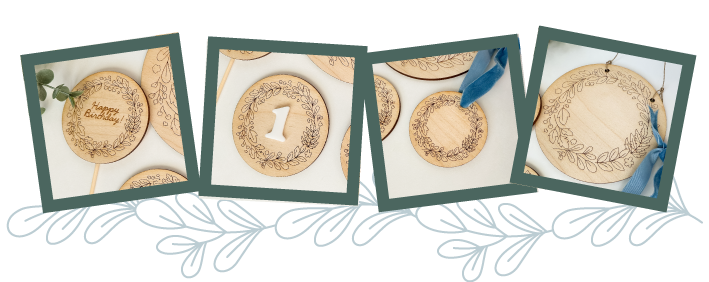
By the end of this course, you’ll have designed your very own scored botanical wreath file that you can create into several file types - baby milestone markers, round door hangers, cake toppers, Christmas ornaments... 
AND You’re free to sell any files you create during the course—how exciting is that?


the lessons:


  • • • LESSON ONE • • • 
Get Started with Scoring Designs
  • Get an introduction to the course, hear about my journey into scoring designs, and get a sneak peek at the step-by-step workflow you’ll be learning.
  • • • LESSON TWO • • • 
Your Assignment: Create a Scored Botanical Wreath
  • Learn about the scored botanical wreath SVG you’ll create in this course and how you can adapt it to your own style and shop.
  • Lesson 2.1: an overview of my workflow
  • • • LESSON THREE • • • 
Designing Scored Motifs on iPad
  • Lesson 3.1: Getting Started with Adobe Illustrator on iPad – A quick interface walkthrough so you can navigate Adobe Illustrator on iPad with confidence.
  • Lesson 3.2: Creating Single Line Motifs on iPad – Learn how to import sketches and use the Pen & Pencil tools to create precise, scalable motifs for scoring.
  • • • LESSON FOUR • • • 
Designing Scored Motifs on Desktop

  • Lesson 4.1: Essential Illustrator Tools for Design – Get comfortable with the must-know Illustrator tools that will make your design process faster.
  • Lesson 4.2: Setting Up a Laser File Template – Streamline your workflow by setting up a reusable laser file template for cutting and scoring.
  • Lesson 4.3: Drawing Motifs in Illustrator on Desktop – Follow along as I create botanical motifs from scratch, using tools like the Pen Tool, Curvature Tool, and Shape Builder Tool.
  • • • LESSON FIVE • • • 
Polishing and Arranging Your Design
  • Take your finished motifs and arrange them into a beautiful wreath, clean up any excess paths, and ensure your design is laser-ready.
  • • • LESSON SIX • • • 
Converting Scored Designs into Engraving Files
  • Want to convert your scoring files into engraving files? This bonus lesson shows you how to quickly adjust your design so you can sell both versions in your shop.

Ready to design scoring files the easy way? Sign up for

$47

✔ Step-by-step video lessons—walk through my exact workflow

✔ iPad & Desktop workflows—choose the method that fits your style

✔ Downloadable practice files—trace and learn with ease

✔ Guided project—finish the course with a ready-to-sell SVG

✔ Bonus lesson—convert scoring files into engraving files effortlessly

Yes! I Want This Course!