


Your Assignment:
Create a Scored Wreath File
Create a Scored Wreath File

YOUR CLASS ASSIGNMENT
Your assignment is to create a scored wreath design—this project will teach you the essential skills needed for creating beautiful scoring designs using Adobe Illustrator for iPad and Desktop. The design you create with this course can be applied to many different projects, such as:a baby name sign
a Christmas ornament
a baby milestone marker
a cake topper
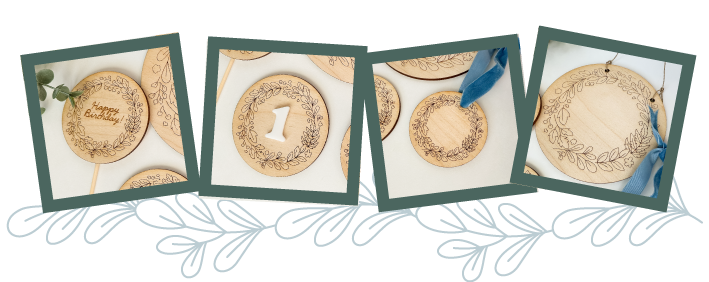 Here’s what we’ll do:
- Create leaf motifs using either the iPad or Desktop Adobe Illustrator apps—using provided templates or your own sketches.
- Create a laser file template in Adobe Illustrator to use for quicker file creation
- Clean up + polish the motifs
- Arrange everything into a wreath shape that can be made into multiple types of laser files
- And as a bonus: learn to turn your scoring file in to an engraving file!
This project is great because it teaches you how to make a design that’s easy to customize. You can swap out motifs, add text, or tweak it for different seasons—meaning you can create multiple files from just one design.
WHAT YOU'LL NEED TO TAKE THE COURSE
This course is recommended for beginner level and beyond knowledge with Adobe Illustrator - I'll be doing a quick review of the specific tools I'm using in this course, but won't be going in depth on the program as a whole.- Adobe Illustrator Desktop App - Required
- Your course resources folder (it's in the sidebar of Lesson 2.1!)
- iPad + Apple Pencil and Adobe Illustrator iPad App - Recommended but not required
While using the iPad is an integral part of my own workflow, you can skip the iPad lessons (Lessons 3, 3.1 and 3.2) if you don't have one and still complete this course! You'll learn many tips + tricks for speeding up your workflow on the desktop app.
Let's get started!